Today I want to show you how to develop an authentication system with JSON using ASP .Net MVC 3.0 and WCF.
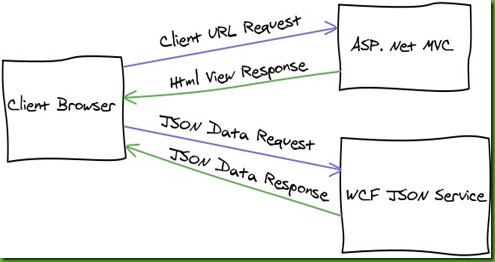
Firstly I want to discuss the system design. I’m using
Asp .Net MVC 3.0 framework to publish Html views to the client browser and for defining pretty URLs in the project. There is no business logic in the MVC framework. I define all my business rules in an WCF Service that only respond to
JSON requests. I’m using JQuery from my Html pages to query the web services for my business data.
You might ask yourself why I would decide on this design?
Benefits:
- Clear separation of concern.
- Smaller request and response data transfers.
- Very Scalable System ( Quickly move web services to Windows Azure ).
- Dynamic Html Views Design.
Negatives:
- JSON data is plain text.
- Require SSL for secure and encrypted data transfer.
I hope you understand the benefits and negatives. There are more benefits and negatives that can be added.
SSL is very important to be enabled when using this approach for authentication. Otherwise the user’s password will be available when transferred to the server.
Authentication Code Example:
Download the code to follow:
JQueryLogin.zip
I created the default
Asp .Net MVC 3.0 project with unit test project included. For this blog I did not do any unit testing. A nice challenge for you! In the solution there are three projects. JqueryLogin project, is the MVC web project. JqueryLogin.WebService project, is the WCF service that will handle JSON requests and business logic. JqueryLogin.Contracts project, is the WCF contracts that is defined for each request and response.
In the MVC web project I use the Razor View Engine. I also clean-up the code to just provide Views with no logic in the controllers. Especially go and look at the AccountController. I did not touch any views that is created by the template. Also I added the necessary JavaScript files that is required to do Ajax requests and create dynamic Html views.
In the _Layout.cshtml I added a bit of special JavaScript resolve function to help resolve URLs in my other JavaScript files. I got the original code from another blog
(Forgot where?) but fixed it for MVC 3.0.
<script type="text/javascript">
    Url = function () { }

    Url.prototype =
        {
            _relativeRoot: "@Url.Content("~/")",

            resolve: function (relative) {
                var resolved = relative;
                if (relative.charAt(0) == '~') resolved = this._relativeRoot + relative.substring(2);
                return resolved;
            }
        }

    $Url = new Url();
</script>
With this function I will be able to resolve URLs like this in JavaScript:
window.location.href = $Url.resolve("~/Home/Index");
Now lets look at the other JavaScript files. The file ajax.js has some infrastructure and setup code that will help me with the requests to the web service. The User.js file is where the main logic is to register, sign-in and sign-out users to the web application.
At the top of the file I define two object Register and SignIn with properties that match the same properties as the RegisterRequest Contract and SignInRequest Contract. The code that follow is where I define where the web service is that needs to be called. The web service methods are called after the Html form pass validation on the submit. Here is the code for sign-in and sign-out of the user:
/// <reference path="jquery-1.4.1.js" />
/// <reference path="jquery.validate.min.js" />
/// <reference path="ajax.js" />

var SignIn = {
    UserName : '',
    Password : '',
    RememberMe: ''
};

var UserServiceURL = "../WebService/UserService.svc/";
var UserServiceProxy = new serviceProxy(UserServiceURL);

$(document).ready(function () {
    $("#loginForm").validate({ submitHandler: function (form) {
        SignInUser();
    }
    });

    $('a[href="/Account/LogOff"]').click(function () {
        SignOutUser();

        return false;
    });

});

function SignInUser() {
    blockDisplay();
    var request = BuildSignInRequest();

    UserServiceProxy.invoke({
        serviceMethod: "SignIn",
        data: { request: request },
        callback: function (response) {
            $('#status').empty().html("<strong>Success: " + response.Message + "</strong>");

            $.unblockUI();
            window.location.href = $Url.resolve("~/Home/Index");
        },
        error: function (xhr, errorMsg, thrown) {
            OnPageError(xhr, errorMsg, thrown);

            $.unblockUI();
        }
    });

    return false;
}

function SignOutUser() {
    blockDisplay();

    UserServiceProxy.invoke({
        serviceMethod: "SignOut",
        data: null,
        callback: function (response) {
            $('#status').empty().html("<strong>Success: " + response.Message + "</strong>");

            $.unblockUI();
            window.location.href = $Url.resolve("~/Home/Index");
        },
        error: function (xhr, errorMsg, thrown) {
            OnPageError(xhr, errorMsg, thrown);

            $.unblockUI();
        }
    });

    return false;
}

function BuildSignInRequest() {
    SignIn.UserName = $('input[name="UserName"]').val();
    SignIn.Password = $('input[name="Password"]').val();
    SignIn.RememberMe = $('input[name="RememberMe"]').val();

    if (SignIn.RememberMe === "on") {
        SignIn.RememberMe = true;
    }
    else {
        SignIn.RememberMe = false;
    }

    return SignIn;
}
WCF Web Service Setup
Now let look at the web service to get all of this working. Firstly you define you web service in an interface file like IUserService.cs. In the UserService.svc mark up you have to change the factory to be able to handle JSON requests and responses.
<%@ ServiceHost Language="C#" Service="JqueryLogin.WebService.Service.UserService" Factory="System.ServiceModel.Activation.WebScriptServiceHostFactory" %>
In the UserService implementation you have to set AspNetCompatibilityRequirements attribute. This will allow for cookies to be set for when the user is authenticated.
[ServiceBehavior(IncludeExceptionDetailInFaults = true)]
[AspNetCompatibilityRequirements(RequirementsMode = AspNetCompatibilityRequirementsMode.Required)]
public class UserService : IUserService
{
    // Implementation Code
}
The implementation of the user authentication can be found in the AccountMembershipManager class and the FormsAuthenticationManager class. The last part that is required for the service is the service binding. For this service I use wsHttpBinding.
<services>
  <service behaviorConfiguration="DefaultBehavior" name="UserService">
    <endpoint binding="wsHttpBinding" contract="JqueryLogin.WebService.IUserService" />
    <endpoint address="mex" binding="mexHttpBinding" contract="IMetadataExchange" />
  </service>
</services>
Show Some Results
I use
Chrome Browser for debugging. I will show you the traced request and response output for Sign-in and Sign-out of user. I underline in red in the images the important details to notice.
SignIn Request –
Click to Enlarge

SignIn Response –
Click to Enlarge

SignOut Request –
Click to Enlarge

SignOut Response –
Click to Enlarge
 Summary
The original idea of using JSON and WCF for creating a responsive website came when I read Chris Love blog entries
“Creating a WCF Service for JSON” and
“WCF and JQuery Using JSON”. The original JavaScript infrastructure come from him. As you can see that JSON allow for speedy web development and responsive web pages.
JQuery just make it so easy to create Ajax calls.
Hope you enjoy this entry and any feedback or questions are welcome.
Cheerio!


